Product building in the AI era, and the new role of the designer
AI changed how products get built. Designers used to draw screens and hand them off. Now we ship the code ourselves. Inside the workflow I use at Zomra, and what it means for the designer's role in 2026.

👋 Welcome — glad you're here. This article distills the past year of trying, iterating, and optimizing as I built real products with this process. If it was useful, leave your email below and I'll keep you posted as it evolves 👇
In the last 12 months at Zomra, four part-time people shipped what a ten-person team usually ships. Two engineers, one designer, one product manager. All part-time. The features are live. Users use them. Other designers tell us the experience feels clean. We didn't double our team, we changed the process. In the next ten minutes, I'll show you the whole process: the steps, the tools, what you need in place first, and the one part of design AI still can't do.
Why the old process is broken
Most product teams still ship in a flow that looks like this.
PM writes a brief/PRD. Designer draws screens in Figma. Engineer translates the screens into code. QA tests. Marketing repackages. Eventually it ships. Then everyone moves on.
This pipeline has three structural problems.
The handover gap. Designers design the perfect version. Engineers build what is possible. Every step between them is a translation, and every translation loses something. Once the feature is live, the idea has been re-drawn three times. The Figma file and the live feature look different. Often in ways the designer never approved.
Design stops too early. Some companies let designers keep improving the product after launch. Most don't, especially in MENA. Design stops the moment code starts. The designer never gets a chance to make the live version better. This is not a small loss. The first version of anything is always the worst version.
Too much coordination. The slowest part of shipping is not design. It is not code. It is the time spent agreeing on what to do. Meetings to review the spec. Slack messages. Quick chats. Comments in Figma. Status updates. A five-person team spends more time agreeing than building.
So if handoffs lose information, designers cannot improve features after launch, and coordination is the real slowdown, the question is no longer how to make design faster or engineering faster. Especially now that AI can help with both. The real question is: what if the same person did the design, wrote the code, and co-shipped the feature, and AI handled the work in between?
That is the workflow at Zomra. Here is how it works.
The process, step by step
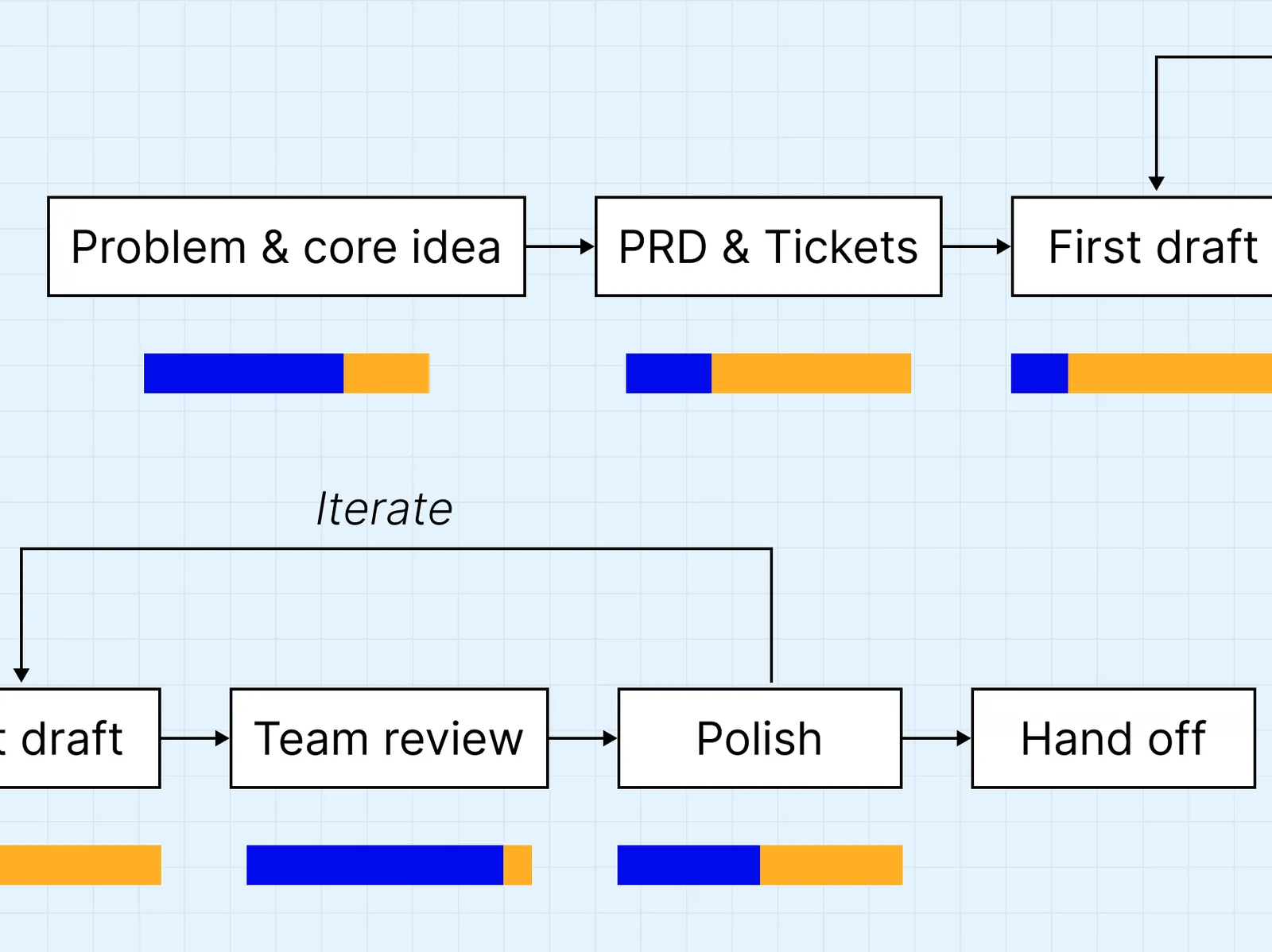
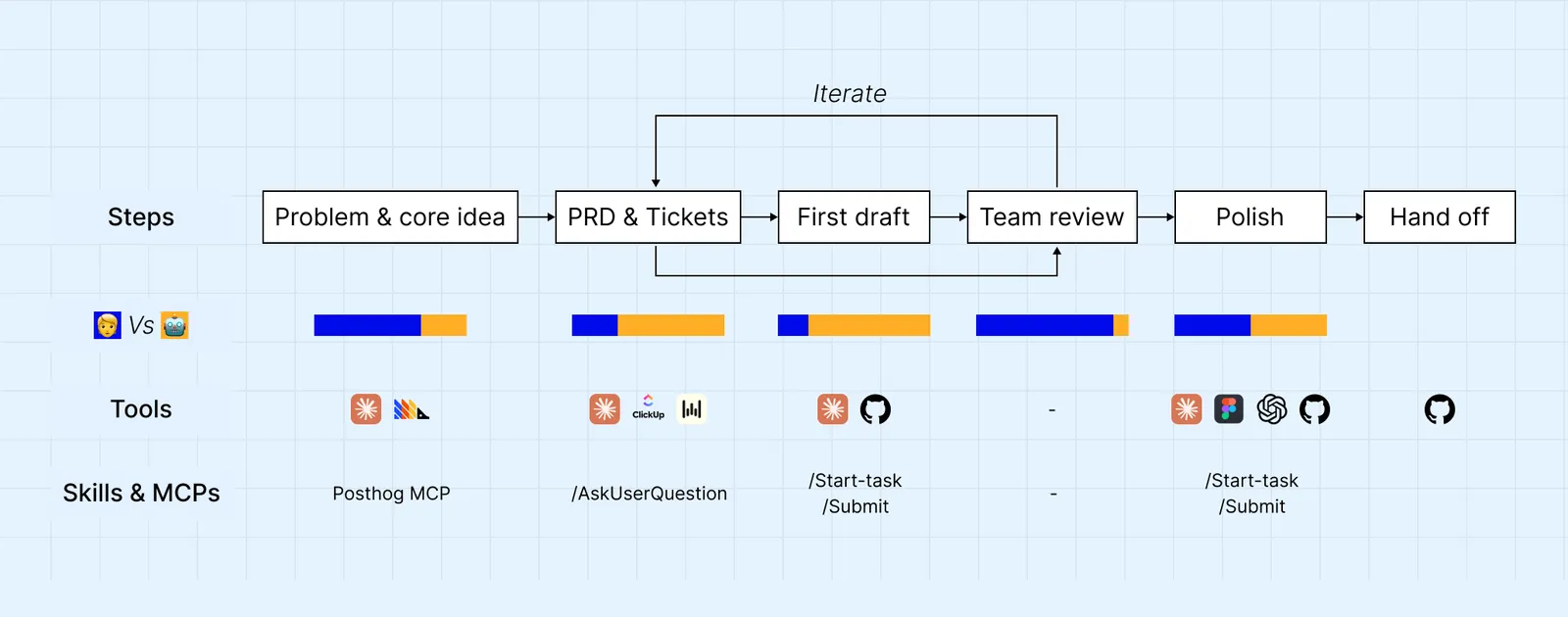 The point of this workflow is not to take the human out of the loop. The point is to put the human where they're irreplaceable. Two camps exist right now.
- The zero-to-one AI camp: agents that generate full apps from a prompt (Lovable, v0, Bolt). Demo-friendly. Production-fragile.
- The full-autonomy camp: "let the agent figure it out." Sometimes works. Often doesn't.
We take a third position. Human-led, AI-executed. The human decides what to build, what good looks like, and when it's done. The AI does the labor in between. It's closer to "a senior operator with infinite junior engineers" than to "prompt-to-app."
The workflow has six steps. Each one has a clear owner, a clear set of tools, and a clear deliverable. The running example is the Discounts and Promos feature we recently built at Zomra: instructors can now create discount codes for students.
Step 1. Problem and core idea. 70% human, 30% AI.
I name the problem, the user, and why it's worth solving now. AI plays a sidecar role like, pulling data form The PostHog MCP which lets Claude give me all the data I need during the conversation, so the problem definition is grounded in behavior and numbers, not vibes.
Tools: Claude, PostHog MCP.
Step 2. PRD and tickets. 30% human, 70% AI.
Me & my prodcut manager co-author the PRD with Claude using the /AskUserQuestion skill, which forces Claude to interrogate me until every implicit decision becomes explicit: edge cases, scope boundaries, success metrics, data model implications. The same conversation then breaks the PRD into ClickUp tickets (through clickup connector), sequenced by dependency.
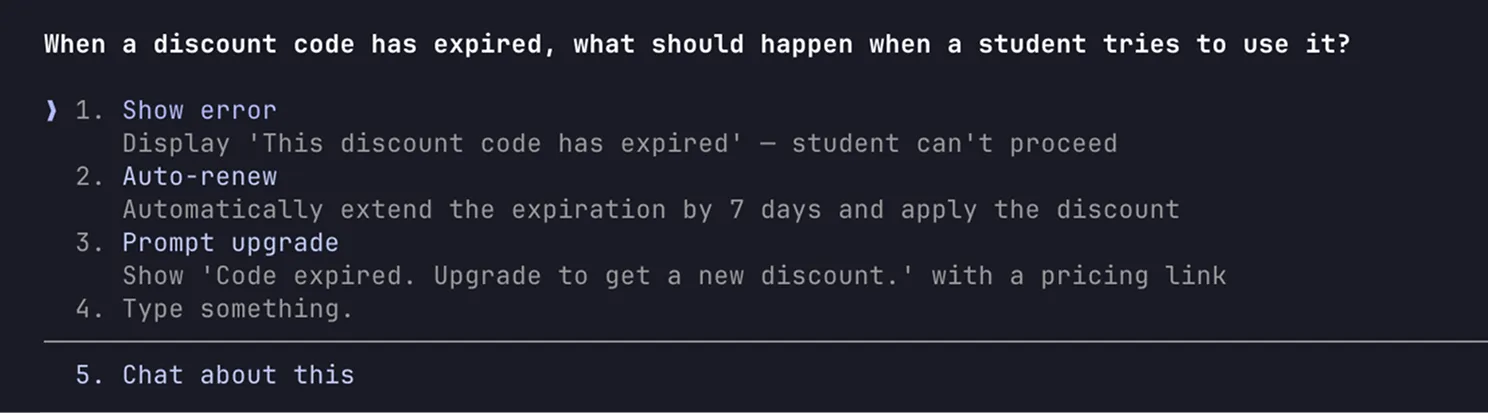 Using Claude's AskUserQuestion skill to draft precise requirementsI do this in voice which helps me give Claude more context about the solution. I used to use Whisperflow (later on I found some opensource alternatives on Github but to be honest none of them were as good as Whisperflow but it does the Job. Check free flow). Typing compresses your thoughts to save your wrists. Voice keeps you in thinking mode, not typing mode.
For Discounts and Promos, Claude asked things like "What happens if the cohort price changes between when the user enters the code and checkout?" and "should an instructor's code apply to future cohorts they create, or only current ones?" These kinda of questions usually make us think about different sceanrios that we have never thought about.
Tools: Claude, ClickUp, PostHog, Wisperflow Skills: /AskUserQuestion.
Step 3. First draft. Mostly AI.
Claude builds the first version of the UI. I use 2 Claude skills built by our front end engineers
/start-task => Sets up a fresh workspace for a new task. Like opening a Figma file from a template, except the "file" is the production codebase.
/submit =>Packages my work into a Pull Request (PR), the engineer use to review code on GitHub. Like a handoff doc, except AI assembles it from the work itself and attach screenshots, a written description and notrs.
For the first time a designer is not opening Figma. The designer is opening a PR.
 A real PR from Zomra's Discounts & Promos feature. With /submit, the ticket was linked, the PR description generated, and 39 commits packaged into a merge-ready pull request,all automatically.Two things to put into considration. The first is a design system in my codebase, so Claude has a known component library to assemble from, which ensures consistantcy and spped. The second is the prompt pattern: I ask AI to not integrate any logic. Focus only on the UI: layout, components, states, responsiveness."
Also, the above skills have rules that forbid integration which lets Claude focus on building the UI beyond the front end logic. Plus gurdrails forbid deploying the code to live website.
Claude's typical output is 60 to 70 percent of what I need. The skeleton is right which is the thing we need to discuss in our next meeting with the devloper and might share with users as a prototype for reasech,
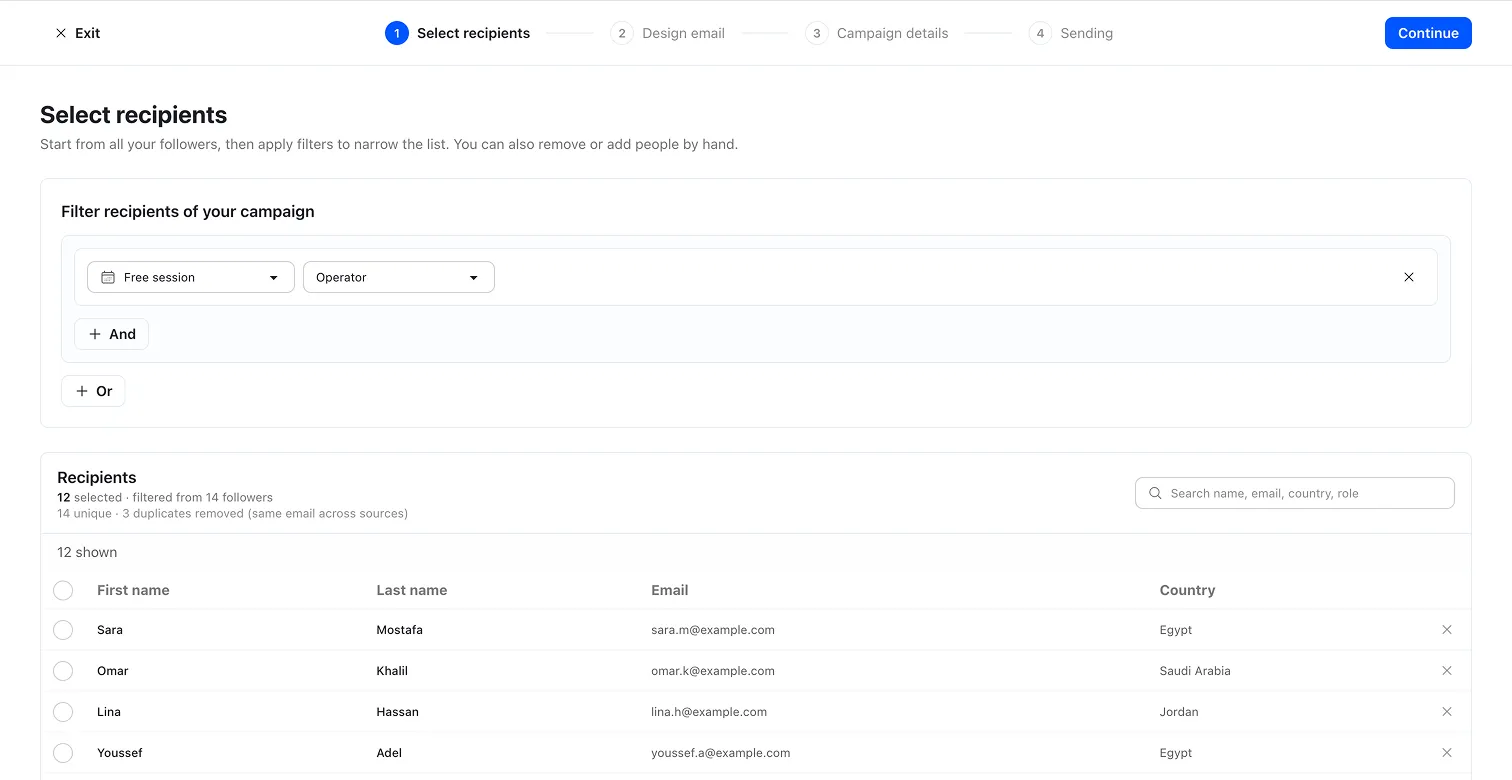 This is the first functional draft of Zomra campaign Tool, our next feature. I use this version primarily for feedback and alignment.
Tools: Claude, GitHub. Skills: /start-task, /submit.
Step 4. Team review.
Before polishing, the team reviews the first draft together: the designer, the PM, and any stakeholder who needs to weigh in. The question at this stage isn't "is this production-ready?". The question is "is this solving the right problem the right way?" and discussing the technical part.
This is the step most teams skip and pay for later.
Reviewing a working draft costs an hour. Reviewing the same feature after polish, after engineering hand-off, after deploy, costs a sprint
If the review surfaces something the PRD missed, the work loops back to Step 2 to update the PRD and re-sequence the tickets.
Step 5. Polish. Mostly human, with AI as a creative collaborator.
Polish runs in two passes:
- Pass 1: Completeness. Did Claude cover all the states, all the breakpoints, empty/error/loading states? Pass 1 is a checklist.
- Pass 2, taste. Spacing, hierarchy, micro-interactions, typography, motion. The small choices that make a UI feel designed, not assembled.
Pass 2 is where AI is most useful in a non-obvious way: not for judging taste, that stays human, but for widening the option space. Asking Claude "what's another way to lay out this card?" gives me three alternatives I wouldn't have thought of alone. The taste decision is still mine. The options got wider. This is also where "Good taste" plays a major role and this hwere I usually get back to design some stuff. For example in the
Polish ends with another /submit cycle, so the existing PR gets updated with the polished version.
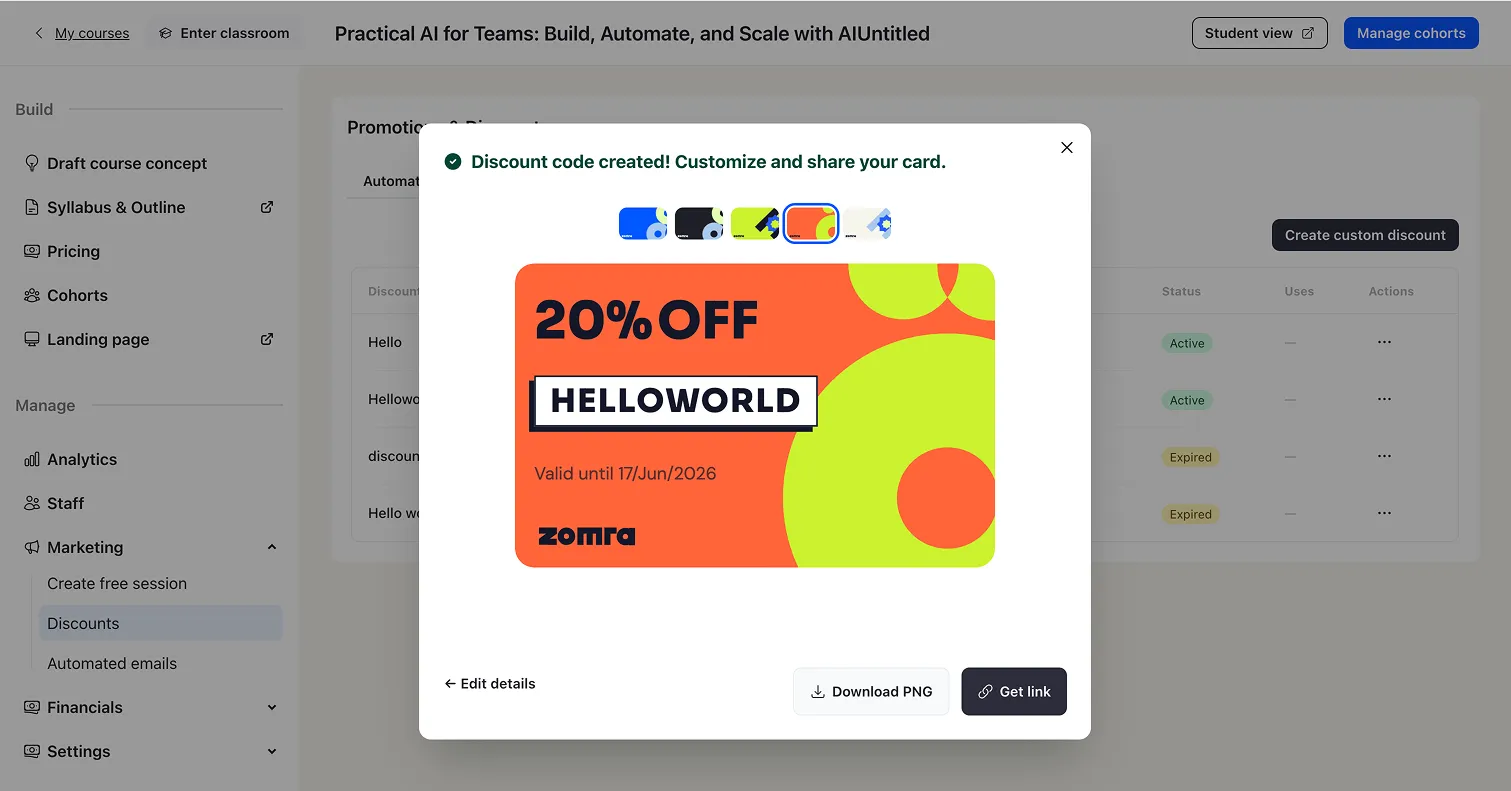 Discounts feature after polishing: adding personal taste and visual refinement
Tools: Claude, Figma, GitHub. Skills: /submit.
Step 6. Hand off.
The PR goes to the engineer. They review for performance, security, and architectural fit. They wire the backend logic, the data flow, and the integration that Step 3 explicitly excluded.
The engineer is no longer a translator. They're a senior reviewer and integrator. And worth mentioning : the engineer at Zomra writes the skills the designer uses to ship. Roles haven't disappeared. They've moved up the stack. The engineer isn't translating Figma into code anymore. The engineer is authoring the system the designer ships through. That's a much higher-leverage use of an engineer's time.
Tools: GitHub. Skills: none, the engineer takes over.
What this process actually gets you
Three outcomes. Each closes one of the three problems from Section 1.
- 95 to 98 percent design fidelity. What ships looks like what I designed and developed because the PR is the design. The code is the design. There is almost nothing left to translate. This resolves the handover gap.
- Less coordination meetings. I talk to the engineer less than usuall. The
/submitskill produces a description that already contains what an engineer used to ask for in meetings: the goal, the user-facing changes, the design rationale, the linked ticket, the screenshots, the edge cases handled. He reads the PR and starts reviewing. No spec walkthrough, no Figma walkthrough, no "got fifteen minutes to sync?" The skill is the meeting, run consistently every time, with no calendar friction. This resolves the coordination overhead. - Post-ship iteration is small and built-in. After the engineer ships, I test the live environment. I usually find some missing scenarios or details that need to be republished, but they rarely exceed 3 to 5 percent of the original polish. Because the cost of starting that cycle is low (no meeting, no spec, no new handoff), iterating post-launch isn't a political fight. It's the next prompt. This resolves the "no room to iterate" problem.
Why adopt this
I'll be honest about how this feels at first.
For designers who grew up on Figma, Adobe xd, and Illustrator, this workflow looks like it sucks. There's no Figma session producing pixel-perfect alternatives. No big reveal. No portfolio shot. The work (mostly) happens in a code editor next to a terminal. It feels less like art and more like plumbing.
That feeling is real. It also goes away within a few weeks, once you see the output. You can fight this. You can talk about how AI lacks soul. None of it changes the econmoics. Business owners, founders and boards are running the math, and the math says ship faster with fewer people.
When execution becomes commoditized and easier, the parts of design that AI can't do become more valuable. Things like taste. Growth thinking. Product judgment. Knowing what to cut. These are now the scarce resources. The designer who learns to ship PRs isn't losing craft. They're redirecting craft to the decisions that make the greater impact.
In the old world, a senior designer spent maybe 70 percent of their time on execution (Figma files, design system maintenance, hand-offs) and 30 percent on judgment. In this world, the ratio flips. 70 percent on judgment. 30 percent on execution. That's not a downgrade. That's a promotion.
Close
This is one essay. The full picture is bigger.
In follow-up pieces, I'll go deeper into more topics like taste, designers operating system and other interesting stuff
The era of pixel devotion is over. The era of judgment-led design has begun.
👋 Welcome bro — glad you're here. This article distills the past year of trying, iterating, and optimizing as I built real products with this process. If it was useful, leave your email below and I'll keep you posted as it evolves 👇